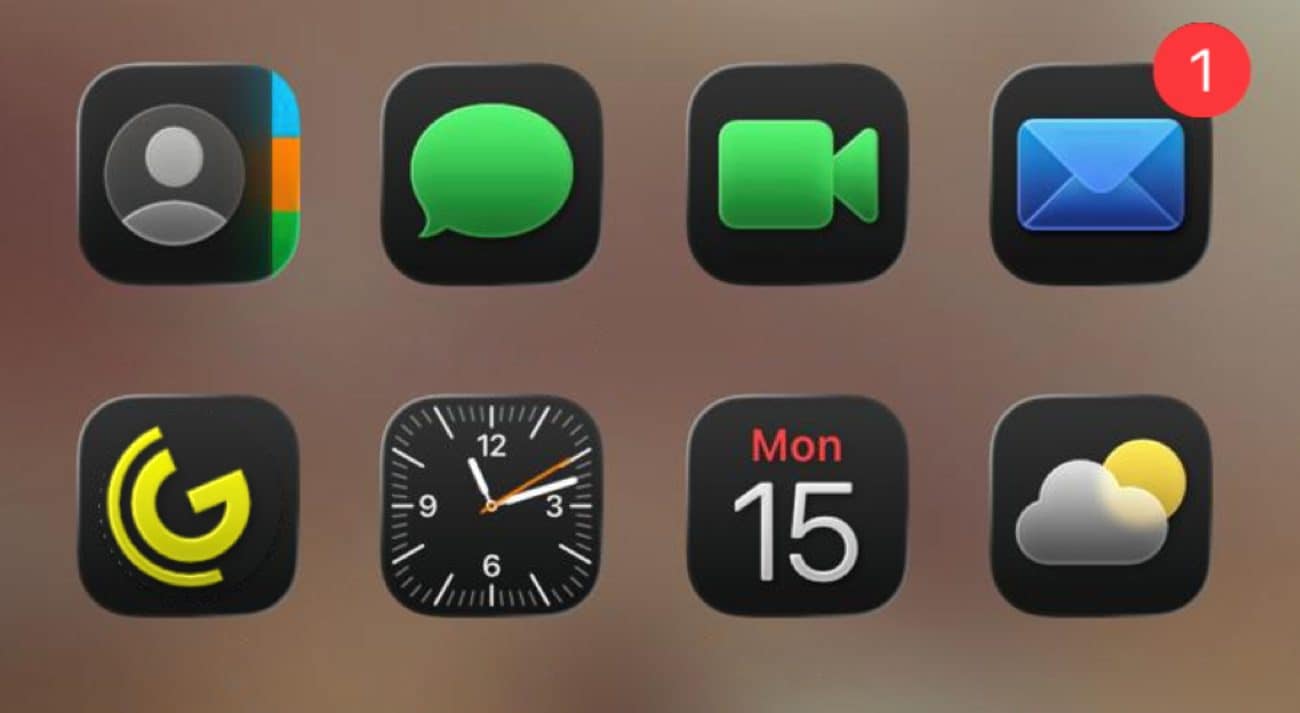
If after updating your iPhone to iOS 26 you have noticed, in addition to a drop in autonomy and performance also a certain discomfort in contemplating the icons of the apps with the dark theme, you are not the only ones. Many users are noting the curious optical illusion generated by the lighting effects applied to the angles of the icons by the new Apple Liquid Glass theme Which makes them appear misalignate creating a sort of “sea pain”, so much so that some have even reported sensations of nausea. It must be said that the thing is somewhat subjective: some users do not notice anything strange, others instead remain immediately affected by this apparent inclinationwhich becomes particularly evident on dark or completely black backgrounds. It is a phenomenon that closely recalls geometric illusions already studied in psychology of perception, such as the so -called Café Wall Effectwhere perfectly parallel lines appear inclined due to the contrast between clear and dark. In this study we will see why it happens, which combinations of backgrounds and themes amplify it and what solutions you can adopt to reduce the impact.
Liquid Glass: the guilty of the “crooked” icons of iOS 26
iOS 26 inherited a new graphic interface, called Liquid Glasscommon to multiple Apple devices: iPhone, iPad, Mac, Apple Watch and Apple TV, which now share the aesthetic of liquid glass, made of reflections and transparencies. In describing the Liquid Glass Apple says that “reflects and refracts the surrounding elements, it dynamically transforms to give more prominence to the contents and gives a new level of dynamism to controls, navigation, apps icons, widgets and beyond».
To make the interface dynamic and three -dimensional, the app icons present one slight brightness along the corners at the top left and at the bottom right. This small detail gives a certain depth to the icons. On some backgrounds, especially the darker ones, and with themes of the icons set on “dark”, “glass” or “shades”, the contrast thus becomes clear to give theIllusion that the icons have an inclination to the left.
Many users have described this perception as a strange, to the point of feeling disoriented or even trying dizziness. Some posts on Reddit They collected thousands of “upvote” (positive votes): there are those who say they have not noticed us at the beginning, but once the inclination once they can no longer ignore it. Others say that the effect makes them feel “drunk”. It is important to emphasize that not everyone experiences the same phenomenon: it depends on individual sensitivity, the brightness of the screen and above all on the combination of the background and style of the icons.
The optical effect is similar to the “Café Wall Effect”
The effect found by some users who have installed iOS 26 reminiscent of that of the so -called Café Wall Effectdescribed at the end of the nineteenth century, which shows how straight lines may seem oblique when they are inserted in a scheme of slightly staggered white and black tiles. The brain, because of the so -called “Simultaneous contrast of brightness”re -elaborates the light from the clear and dark areas adjacent by creating false oblique alignments. The same principle seems to act on the icons of iOS 26: the Illuminated corners interact with the uniform black background, amplifying the perception of inclination.
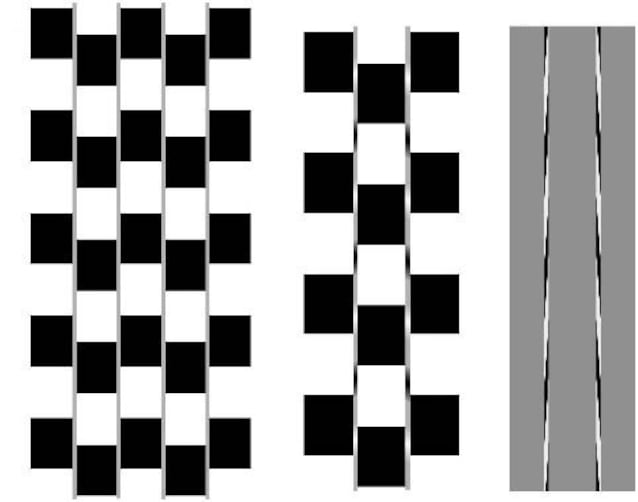
How to solve the “problem” of the dark icons of iOS 26
If you have come across this effect, you will probably have sought solutions in the accessibility settings. Apple has been offering options for years like Reduce movement And Reduce transparency To limit animations and overlaps, designed for those suffering from nausea or disorientation with certain graphic effects. In this case, however, neither the reduction of the movement nor the decrease in transparency seem to eliminate the reflections that cause optical illusion.
Waiting for a possible correction via software by Apple, then, as you can Solve the optical illusion of the dark icons of iOS 26 (or at least mitigate the effect in question)? Quite simply going to change theme (then setting the clear one instead of the dark one) or changing the background (favoring colors that break the uniformity of black, perhaps images that have many details rather than large areas with shaded shades). In this way the brain receives more visual stimuli and does not focus attention exclusively on the reflective corners of the icons.
