Google decided to bring in Italy some of the most anticipated features of Geminihis AI-based assistant. This is a significant update that points in a very specific direction: making Gemini an increasingly personalized assistant, capable of remembering who we are, what we like and how we communicate, instead of responding the same way to everyone. Among the most interesting innovations we find the introduction of “Memory” functionwhich allows the assistant to learn from past conversations, and the ability to import entire conversations from other AI chatbots. With this latest innovation, Google wants to lower the entry threshold for those who want to try its assistant, eliminating one of the most concrete obstacles, namely having to start from scratch and “re-educate” a chatbot to have a personalized user experience. Let’s see in detail how these new features work and what actually changes for those who use Gemini every day.
Gemini’s “memory”.
The most significant innovation is the Memory functionwhich is finally also available for Italian users. When this setting is active (for the record, it is enabled by default) Gemini is able to retain information and preferences that emerged in previous conversations. The result is that the answers become progressively more relevant and less generic. If, for example, we have already talked to Gemini about our favorite comics, the next time we ask for an idea for a themed party, the assistant could suggest something consistent with that given interest, instead of proposing standard solutions. The same goes for books: if in the past we have discussed certain non-fiction titles, Gemini will be able to take this into account when recommending new ones, also suggesting quotes suitable for sharing on social media.
The function, however, can be disabled at any time from the app settings, in the section Personal context > Memory. It is also possible to consult and delete saved conversations through the section Activity.
Importing memory from other chatbots
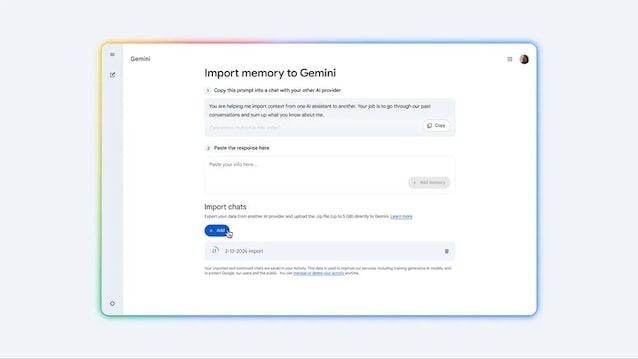
The second novelty concerns those who come to Gemini from another AI assistant – such as ChatGPT or Claude, for example – and do not want to lose the customization work already done with these chatbots. Google introduced one memory import toolwhich allows you to transfer a summary of your preferences, relationships and personal context to Gemini. The operation is simple: a appears in the Gemini settings new import optionwhich generates a prompt, i.e. an instructional text, to be copied and pasted into the other AI chatbot used up to this point. The latter will produce a summary of the information concerning him: just copy and paste it into Gemini, which will analyze it and save the data in your personal context. In this way, Gemini will already know, for example, the names of our family members, the places where we grew up or our main interests, without having to repeat them to Gemini too.
Importing entire chat history from competing AIs
Then there is a third option, designed for those import your entire chat history into Gemini. To take advantage of this option, simply upload a ZIP file exported from another AI service and Gemini will make it accessible and navigable within it, allowing you to resume previous conversations or delve deeper into topics already covered. Google emphasizes that this process is safe and takes place entirely within the user’s ecosystem.
