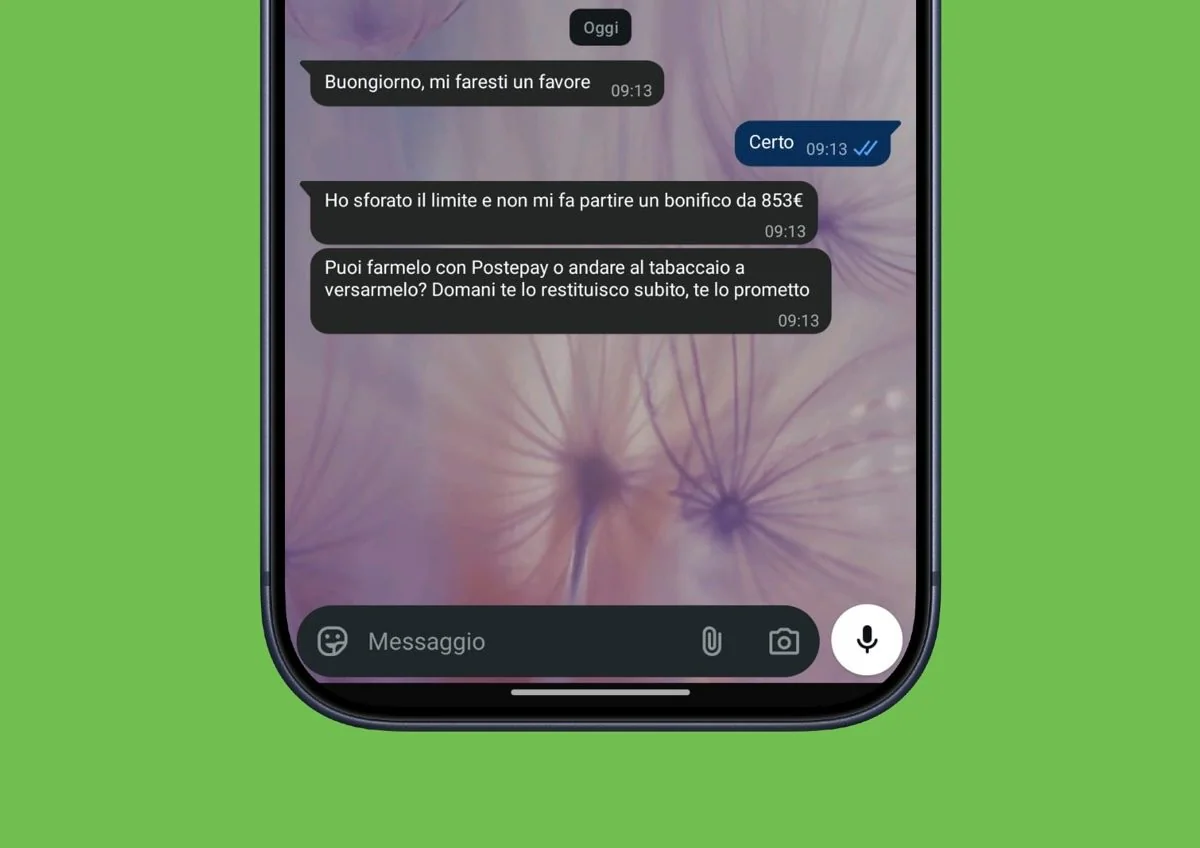
If you have an iPhone, update it immediately to the latest version available. A new wave of attacks exploit a system bug to send illegitimate money requests via WhatsApp.
«Would you do me a huge favor? I have exceeded the limit and it won’t send me a transfer of X euros. Could you anticipate it yourself instantly?». In other “variants” of the scam, money is requested by topping up prepaid cards, such as Postepay. If used WhatsApp and you have a iPhone which is not updated to the latest version of iOSApple’s mobile operating system, similar messages could be sent from your account to your contacts, without you realizing it, unless one of them informs you of the arrival of strange requests in your name. What we have just described to you is one of the most obvious signs of new wave of compromises affecting iPhone userswith attacks that in some cases can exploit iOS and WhatsApp vulnerabilities without requiring any action from the victim whose account is stolen. According to some news, the problem already affects hundreds of people and we in the editorial office have also received some reports.
How the scam works and how they steal the account to ask for money
These types of attacks exploit vulnerabilities, i.e. defects in software, which can be used by criminals to bypass the protections of a device or application (such as WhatsApp). Unlike classic phishing-based scams, the victim is not required to click on a link or enter their credentials on a fake page.
The reports concern Outdated versions of iOS and WhatsApp on Apple devices. Once access has been obtained, attackers can exploit the account to send messages to contacts in the address book, pretending to be the legitimate owners of the account. Requests for money can be direct, for example using an alleged problem with the current account as an excuse, or leverage a family emergency of some kind. The person receiving the communication, if they are not a particularly careful user, could trust the message and follow the instructions received, thus sending the money to what they believe to be their trusted contact, unaware of the fact that the latter has lost, at least in part, control over their account.
How to realize that WhatsApp has been compromised
Now that we have a general understanding of how the attack works, let’s see how to find out if your WhatsApp account is affected from a similar attack or not. The first alarm bell may come from your contacts. If someone warns you that they have received a request for money that you never sent, it is important not to beat around the bush and immediately check what is happening. Since attackers could delete messages sent via the “Delete for me” function, the cooperation of your contacts is essential from this point of view.
Another check to carry out concerns the section WhatsApp “Connected Devices”.where the active sessions on other devices associated with your account are listed. If you find a computer or other device that you don’t recognize, it could be a sign of unauthorized access: in that case, log out immediately. Keep in mind, however, that the absence of unknown devices from the section just mentioned does not necessarily exclude a compromise. Attacks of this type can exploit software vulnerabilities and go unnoticed, not manifesting themselves through an easily identifiable session in the “Connected Devices” section.
How to recover your account and secure your iPhone
If you suspect that someone is using your account or are even sure of it (perhaps thanks to one of your contacts who reported the arrival of anomalous messages from you), the first thing to do is notify all your contacts of the problem through a secure channelfor example in person or with a phone call or text message. This way you can inform them that any requests for money or suspicious links do not come from you.
Then make a backup of your chats, uninstall the WhatsApp app, redownload it on your iPhone and reconfigure it following the guided procedure provided on the screen. More importantly, go to the section Settings > General > Software Update of your iPhone e install the latest available update (at the time of writing it is iOS 27.2). Finally, we advise you to report the matter to the Postal Police, so as to help combat the phenomenon.