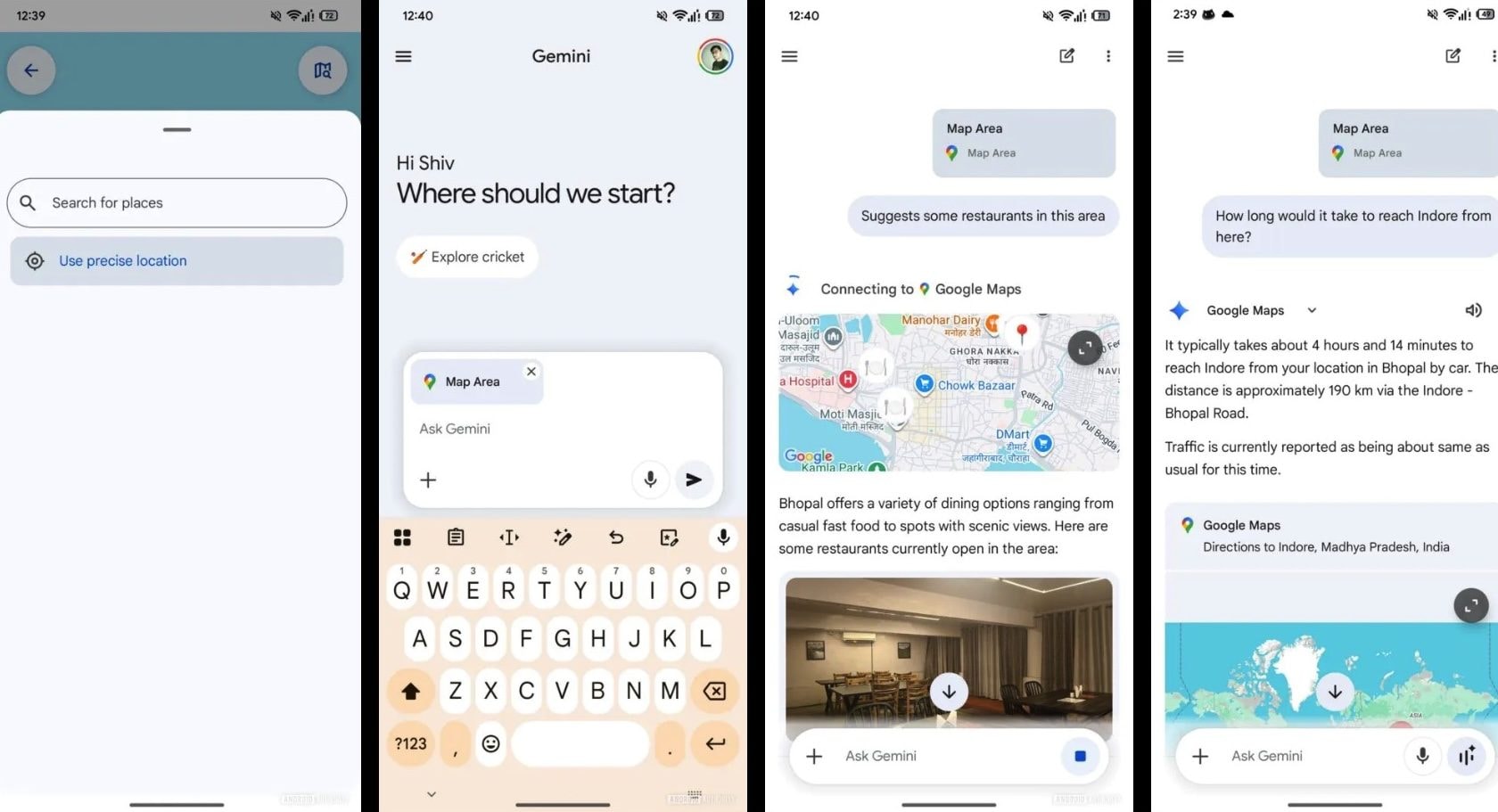
Gemini is preparing to make an important leap in quality by integrating directly Google Mapswith the aim of transform into a real conversational local guidecapable of answering questions related to a specific place starting from a map. This innovation could enable the user to communicate with an artificial intelligence system that “sees” a selected geographical area and uses it as a context to provide suggestions, evaluations and information.
This evolution emerged from an in-depth analysis of the Google app documented by the portal AndroidAuthorityhighlights how the integration between linguistic models and geographical data can provide a decidedly interesting experience of using maps and AI. This would put us in a position to be able to ask Gemini questions with a natural language and, in these conversations, receive ad hoc suggestions, as if we were talking to a local person. Early tests indicate that the feature is still in development and has accuracy limitations that have not yet been resolved.
How the integration between Gemini and Google Maps works
The possibility of connecting Gemini with Google Maps had been spotted by AndroidAuthority a few weeks ago, when some clues hidden in the code of the Google app were discovered. Among other things, the button “Maps” appeared in the Gemini tools interface, but remained grayed out. Thanks to a new analysis of the Google app, and in particular the version 17.6.58.ve.arm64 of the latter, the possibility of enabling the button emerged “Maps” within Gemini and directly select a geographic area to associate with a text request. In this way, the map becomes an integral part of the input sent to Gemini.
From a practical point of view, this allows you to choose an area on the map and ask for contextualized suggestions: restaurants, tourist attractions, hospitals, and so on. And the most interesting aspect in all this is related to being able to send these requests in a way conversational. Unlike the function “Search this area” of Google Maps, which returns results based on a predefined search, Gemini takes advantage of the typical capabilities of a LLM (Large Language Model), that is, an artificial intelligence model trained on huge amounts of text to understand natural language. Simply put, this means that you do not need to formulate a precise and technical request to receive a quality output, but it is sufficient to “converse” with the model using natural language.
Just to give an example, to find a typical restaurant in the reference area, just ask «Where should we eat here?» leaving the system with the task of interpreting the geographical context and the intent of the user who made the request. This logic also opens the door to more complex questions that go beyond simply searching for places of interest. We can ask (with all the limitations of the case) if an area is generally safe in the evening or what the rents are in that area.
The graphical interface discovered by AndroidAuthority confirms this ambition. Touching the button Maps In the Tools section of Gemini, a full-screen view opens with familiar tools: a search bar, the current location button, and the “Explore this area”. You can zoom in or out on the map to better define the area of interest before attaching it to the prompt (the text request to be sent to the AI) and there is also an option to use precise position, which allows Gemini to focus exactly on where you are at any given moment.
Stability and accuracy not yet satisfactory
Some elements of the interface are still unstable and, in some cases, searching for places causes the app to freeze: a clear sign that we are faced with a function that has not yet been refined. Once the request is sent, Gemini relies on the Google Maps extension to generate the responses. In tests reported by AndroidAuthorityhowever, theaccuracy was not always up to expectations: Even when selecting a specific area, the AI tended to suggest locations spread across the city. This behavior suggests that the system understands the overall intent, such as searching for restaurants, but still struggles to meet the geographic constraints imposed by the user.
