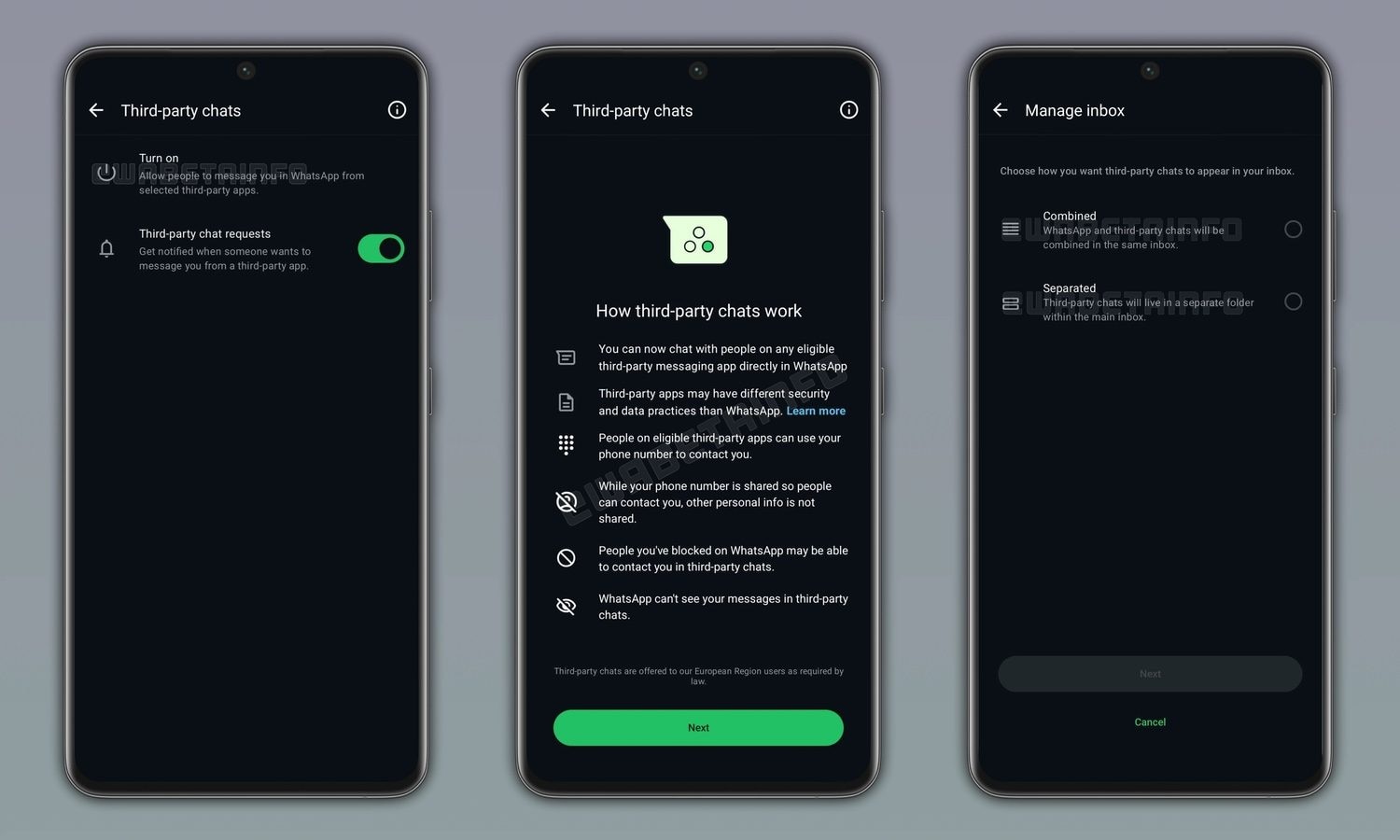
The function “Third Party Chat” of WhatsApp is slowly reaching more and more users and, for the first time in Europe, allows you to exchange messages with users who use different messaging applicationsprovided they are integrated and authorized and in compliance with the DMA (Digital Markets Act). It is a novelty that arises from the adaptation to European rules on digital markets and introduces the concept of interoperabilitythat is, the ability of harmonically different systems to communicate with each other. By activating the option, we can receive and send text messages, photos, videos, voice messages and documents with people who do not use WhatsApp, while still using the Meta app. The contents are encrypted in transit, therefore protected as they travel over the network, and WhatsApp cannot read them.
Each external app, however, maintains its own data processing rules, which may differ from those we are used to. The function is not universal: it is only available in some European geographical areas, only on Android and iPhone smartphones and only for accounts registered with telephone numbers in countries where the DMA is in force. If we change our number to a non-European one, access is lost. Activation requires explicit and informed consent, precisely because it opens WhatsApp to a broader and less centrally controllable ecosystem. In this study we explain how interoperability works, how to activate third party chats on WhatsApp.
What other compatible apps are and why WhatsApp can communicate
The opening of WhatsApp to third-party messaging apps is not a spontaneous choice undertaken by Meta, but the consequence of the obligations imposed by the European Union on the so-called gatekeepera term that indicates large digital platforms with a dominant role in the market. The DMA requires these actors to avoid closed, often defined, ecosystems “walled garden”or fenced gardens where you can only communicate with those who use the same service. With interoperability, this fence is partially opened: different systems can communicate according to common standards.
Let’s be clear: it is not possible to chat with users who use any app. Apps compatible with WhatsApp interoperability are those that meet specific criteria. In this case, these apps must sign a agreement with Meta and adopt the protocol Signal encryption. At the time of writing this article, only these two semi-unknown solutions are among the few apps that are compatible with the function: BirdyChat And Haiket. At the moment, therefore, more famous messaging apps, such as Telegram, Signal and iMessage, which are not yet compatible with the feature.
How to activate (and deactivate) third-party chats on WhatsApp
Let’s see together how to activate “Third Party Chat” on WhatsApp using a procedure that, for better or worse, is identical on both Android and iOS. After updating WhatsApp to the latest version available, proceed as follows.
- Open theWhatsApp app and go to his Settings (in the most updated version of WhatsApp for iPhone, this section can be reached with a tap on the item Youat the bottom right of the WhatsApp screen).
- Go to the section Accounts > Third Party Chats.
- Touch the voices Activate And Continues.
- Select the apps to make interoperable with WhatsApp (e.g. BirdyChat).
- Tap on again After you and choose how you want third-party chats to be shown in the WhatsApp inbox: Combinedso that WhatsApp and third-party chats will be combined in the same box or Separateif you want third-party chats to be shown in a separate folder.
- Touch After you and follow the on-screen instructions to complete the operation.
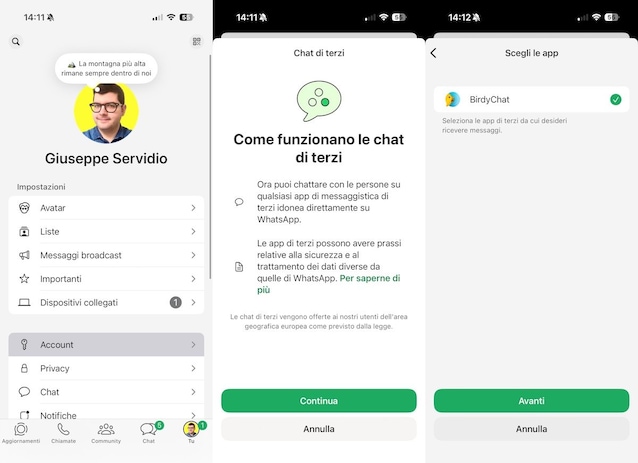
If in the future you decide to deactivate the function, simply open the WhatsApp app and go to Settings > Accounts > Third Party Chatstouch Deactivate and finally confirm it with a tap on Deactivate.
The security implications of third-party chats
From the point of view of safetythe messages sent and received are encrypted during transit. There end-to-end encryptioni.e. that system in which only the sender and recipient can read the content of a chat, is also extended to third-party chats while the data travels on the network. When we communicate with an external app, however, the his data processing policies. This means that WhatsApp cannot guarantee 100% how the other platform manages information such as metadata, i.e. “background” data such as times and recipients (but WhatsApp has also shown over time that it is not perfect from this point of view, as demonstrated by previous security incidents in which the platform has found itself the protagonist). Additionally, the third-party app can see the phone number associated with our WhatsApp account, and people who already know that number may contact us through the services we have enabled.
There are also practical implications to consider. Users who have decided to block a contact on WhatsApp, for example, could find themselves in the situation in which the latter manages to have their messages delivered via third-party apps, making it necessary to intervene with the blocks again. That’s why the feature is optional and can be left turned off.
