An important novelty concerning LinkedIn will come into force from November 3, 2025. The platform will begin to use the content that users over 18 share on their profile – posts, comments, reactions and many other public activities in their default – for train the generative artificial intelligence systems that is developing. This is not an isolated initiative: already at the end of 2024 the platform had started a similar program in some selected countries, such as the United States, with the promise to gradually expand the range of action. That moment has evidently arrived: the new rules will also be extended toEuropean Unional United Kingdomat the Swissat the European economic space and in general to all the regions initially excluded from the change. The main novelty does not therefore concern the nature of the operation, but the fact that from November the change will involve practically anyone on the Microsoft platform. In this study, in addition to explaining more in detail what data will be given to the AI of LinkedIn, we will also show you How to prevent the platform from using your data For the purpose of training of its artificial intelligence model.
What data will LinkedIn use to feed his AI
If you are wondering What information will LinkedIn use for the training of his Aiyou must know that for better or worse the platform will use practically any available public data. The company specifies in a dedicated section of its site that almost everything you produce on the platform can fall within the process: post, articles, Responses to surveys, comments, Profile data which are public: name, photos, current working position, previous professional experience, training, locations, skills, certifications, licenses, voluntary experiences, any publications and available patents, confirmations of skills, references, etc.
Private messages, access credentials, data relating to payment methods, data on the salary provided by users or data relating to the applications attributable to a specific user are not included in the training of the LinkedIn model. For legal and protection reasons, all the data from the profiles of minors of 18 years of age remain excluded. For all the others, the setting is automatically active. This means that if you do not intervene manually, your data will be used without having any action.
How to deactivate the LinkedIn AI function
Let’s see, at this point, as you can oppose the use of your data for training of LinkedIn. Below we show you the procedure to follow both by the LinkedIn app and from its web interface.
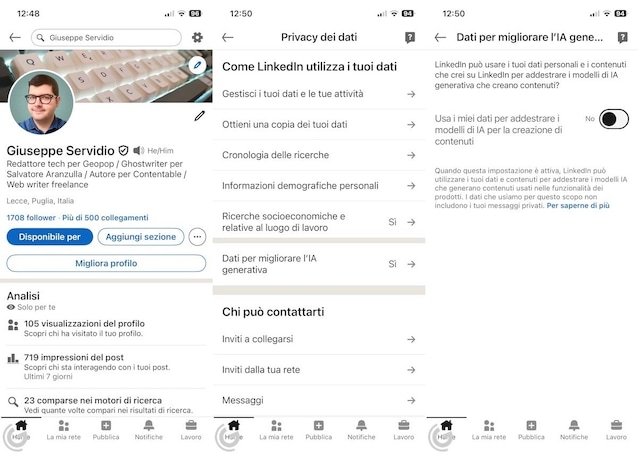
From the app
- Open theLinkedIn app.
- Tap the icon of thegear at the top right (if you are on your profile) or tap on the Miniature of your profile photo placed at the top left and touch the item Settings located at the bottom of the open menu.
- Follow the path Data privacy> Data to improve generative IAs and move the switch to No.
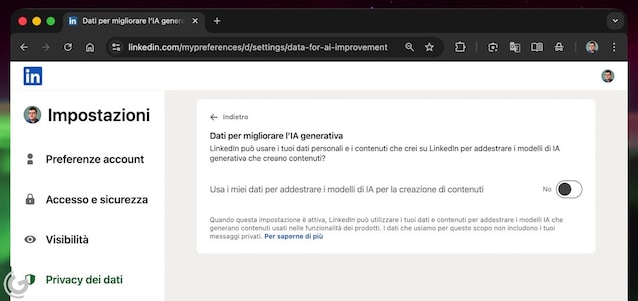
From web interface
- Do Login to your LinkedIn account from web desktop interface.
- Click on the menu You (near your profile photo, at the top right) and select the item Settings and privacy.
- Follow the path Data privacy> Data to improve generative IAs and set the switch on No To deactivate the option.