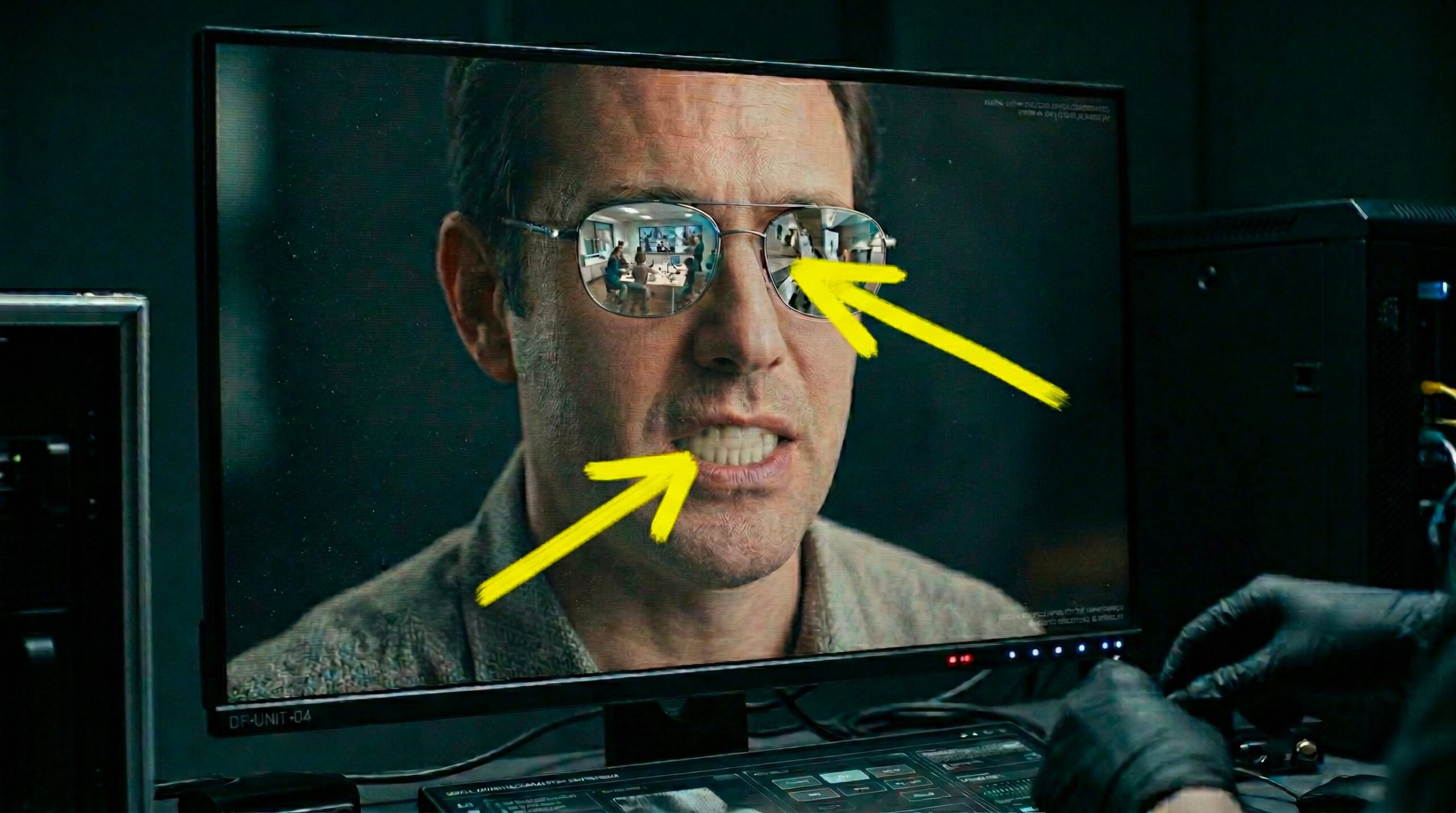
Succeed in distinguish a real video from one generated by artificial intelligence is becoming an increasingly complex challenge. In recent years the so-called deepfakethat is, those synthetic contents that imitate real people, voices and situations, have reached levels of realism that can potentially deceive anyone. Today, video generation tools based on machine learning models allow even those with little advanced technical skills to create convincing videos. As a result, artificial videos are increasingly circulating on social media: they can be funny clips with imaginary animals, but also false speeches by celebrities and public figures or, again, alleged recordings of events that never happened, real historical fakes artfully created to generate misinformation. In this in-depth analysis we will try to reel off some practical advice to try to recognize videos generated with AI. We talk about “trying” because the videos generated with AI have reached such a level of realism that it is not always possible to establish with full certainty the nature of the video that passes under our lens.
How to recognize a video made with AI
What deepfakes are and why it is increasingly difficult to recognize them
To understand how to orient ourselves in this scenario we must first understand what we are talking about. With the deadline deepfakefusion of English words deep learning (an advanced machine learning technique) e fakethat is, false, are indicated videos, images or audio generated through algorithms that imitate the appearance or voice of a real person. These systems analyze large amounts of data to reproduce facial movements, expressions and vocal timbre with great precision.
While until a year or two ago it was much easier to identify the artificial nature of these videos, today things are different. Technology is improving very rapidly. And the latest models can create high-definition videos with believable motion, realistic lighting and perfectly synchronized audio. Tools like Sora 2, developed by OpenAI, or Veo 3, designed by Google, represent emblematic examples of this evolution: they produce clips with high visual quality and coherent scenes from a narrative point of view. Some include features (like Sora 2’s “Cameo”) that allow you to use other people’s likenesses and insert them into almost any AI-generated scene.
3 practical tips for recognizing videos made with AI
Now that it’s a little clearer what a deepfake video is and how it is generated, let’s see 3 tips for recognizing deepfakes made with AI.
Identify the presence of a watermark
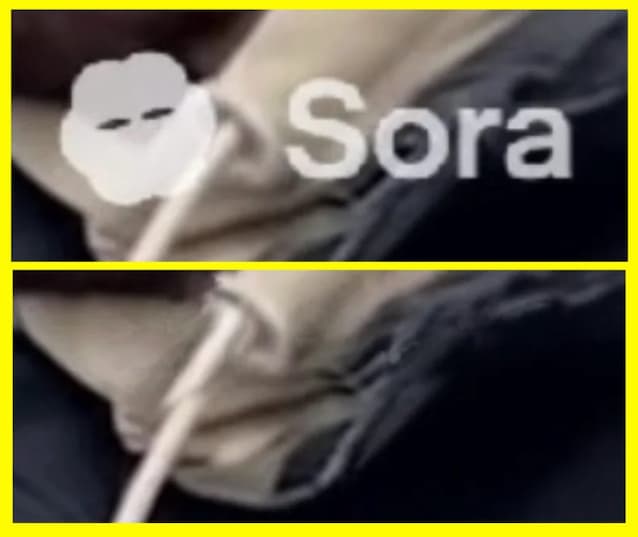
A first useful clue may be the presence of a watermarki.e. a graphic sign automatically applied to the content. Some platforms include a logo or symbol to indicate that the video was created with artificial intelligence tools. In the case of content produced with Sora, for example, videos downloaded from the app include a “cloud” icon that moves along the edges of the image. It is a sort of visual label that indicates the origin of the content. But be careful: it is not an absolute guarantee. If the watermark is static it can be cut out and removed, and there is software capable of removing even animated ones (like Sora’s) in a handful of clicks. For this reason, the lack of a watermark does not necessarily indicate that the video we are watching is authentic.
Analyze file metadata
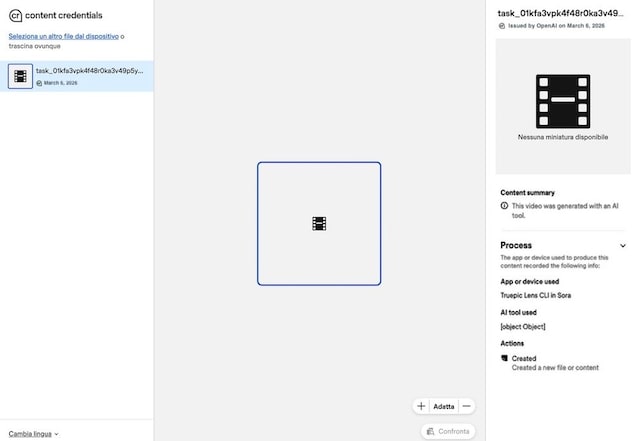
A more technical method is toanalyze the file’s metadata. With this word we indicate a whole series of information that automatically accompanies digital content when it is created. Metadata may include the type of device used, the date and time of recording, geographic location, or the software that generated the file. Some videos created with AI models contain specific indicators that reveal their origin. For example, Google “brands” content generated with its AI models with the system SynthID. As for videos generated with Sora 2, however, these are marked with metadata C2PAsince OpenAI (the company that develops Sora) is part of the Coalition for Content Provenance and Authenticity. Here is a mini-guide on how to verify the metadata in both cases.
- Visit this page of ContentAuthenticity site.
- Upload the file you wish to verify by clicking on Select a file from your device or by dragging it into the dashed box.
- Check the information in the right panel. If the content is generated by AI, you should see a summary on the right similar to the one you see in the following example screenshot.
Alternatively, you could upload the video to Gemini and ask Google AI if the movie contains SynthID metadata.
However, it is good to keep one fact in mind: these AI-detecting tools are not infallible. This means that even an AI-generated video may not be flagged as such by these metadata detectors.
Carry out a critical analysis of the video
Alongside technical tools such as those mentioned above, we can also rely oncritical observation of the video. In the most sophisticated deepfakes it may not be easy to identify clues that betray the artificial nature of the content, but if the video is imperfect and has some micro-defects, identifying them can help fuel any suspicions. Here you are 7 clues you should try to spot:
- Unrealistic lighting or shadows.
- Excessively smooth skin.
- Slightly deformed teeth or eyes.
- Unnatural reflections on glasses.
- Irregular blinking.
- Rigid or “flat” emotional expressions.
- Audio not perfectly synchronized with lip movement.
Naturally these signs are not always obviousespecially in videos generated with the most advanced technologies. For this reason it is advisable to integrate the visual analysis with the analysis of the metadata (as already mentioned before) and also with a verification of the facts and any declarations presented in the video which is the subject of the analysis. Just for example, if the video shows a politician making certain statements, searching on Google for the exact phrases he uttered can allow you to find matches or not, which can give further clues to the origin of the content. This verification process, typical of journalistic work, remains one of the most effective tools even for “common” users.
