
Spotify has announced a novelty that many of its users had been waiting for for years: theArrival of music streaming in lossless qualitythat is, without loss of information in the compression process of the audio file. The function with is being distributed in 50 selected markets including the United States and Japan and will be accessible without additional costs for those with a Premium subscription (even if the price of the service is recently strictly increased by 1 euro). This means that users who are already paying will not have to buy separate plans or upgrade to their subscription to enjoy high loyalty audio. Let’s see more in detail What is the audio lossless, who can take advantage of it And How to activate it on Spotify.
What is the audio lossless and who can take advantage of them on Spotify
THE’audio lossless On Spotify allows you to listen to the songs in format Flac (Free Lossless Audio Codec) until 24-Bit/44.1 KHzguaranteeing a Superior sound detail compared to standard settings. This is because the Flac is an audio compression format without quality loss. Unlike compressed audio or lossywhich deletes some sound information to reduce the file size, The audio lossless keeps the range of frequencies intactoffering a more detailed and faithful reproduction. This involves larger files and slightly higher loading times, but on the other hand you have a clearly higher quality, perceivable especially with good quality systems or headphones. For those who listen mainly in streaming on the cellular network, Spotify allows you to configure the desired quality also on the move, clearly showing the consumption of data associated with each level. In this way the user will be free to balance sound quality and management of data traffic according to his needs.
Thanks to this novelty, users can therefore choose, in addition to the classic options already available (Low, Normal, Tall And Very high), also the one called precisely lossless. The quality offered by this mode is not yet the maximum level that can be reached on the market – Apple Music And Amazon Musicjust to mention a couple of examples, they come to 24-Bit/192 kHz – but it certainly represents an important improvement for those who want a richer and more faithful listening experience than before.
The function will be compatible with mobile and desktop devices, as well as with numerous audio systems supported by Spotify Connect, including devices of popular brands such as Sony, Bose, Samsung and Sennheiser. Subsequently the function will also be extended to Sonos and Amazon products. To take advantage of the function it will be necessary to have a Subscription to Spotify Premium Active.
The availability varies according to the geographical area in which you are. Premium users of Australia, Austria, Czech, Denmark, Germany, Japan, New Zealand, Netherlands, Portugal, Sweden, United States And United Kingdom they already have access to the novelty. In the coming weeks and months the rollout of the function will cover a total of 50 markets (presumably also the Italian one, but at the moment Spotify did not specify it). When the function will also be available also on your Premium account, You will receive a notification Directly in the Spotify app that will inform you of the thing.
How to activate the audio lossless on Spotify
Once the function is received, for Activate the audio lossless on Spotify It will be necessary to follow the following steps.
- Open theSpotify app and access yours Premium account.
- Tap the icon of yours profile at the top left.
- Follow the path Settings and privacy> multimedia qualities and select the option Lossless.
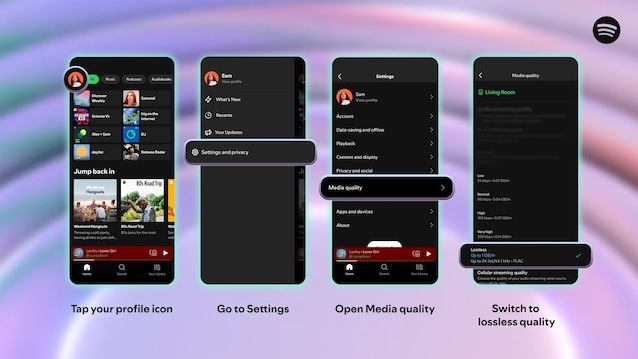
The procedure just illustrated will be repeated on each device on which you want to listen to content in high loyalty. Once performed, the indicator “Lossless” will confirm the success of the operation. To obtain maximum benefits when listening to lossless mode, Spotify recommends that you Use wired headphones or systems and a stable Wi-Fi connection, because the bluetooth “Currently (…) it does not provide a sufficient bandwidth to transmit audio without losses, so the signal must be compressed before being sent».
