
Based on the architecture of Gemini 3, the new model text-to-image Nano Banana Pro of Google has demonstrated the enormous evolutionary leap that the Mountain View giant has managed to make. Although it is a powerful tool, in order to use it effectively you must learn to use it well. In this in-depth analysis we will provide you with 7 practical tips for using Nano Banana Pro as a graphic designer personal. We will therefore start from some “basic rules” for building a effective prompti.e. a textual input that can allow the model to create an output image that is as much in line with the idea we had in the beginning. Then, in the second part of the article, we will show you some practical examples of what you can do with Nano Banana Pro. Let’s go!
How to Build Effective Prompts for Google’s Nano Banana Pro
How to build an effective prompt for Nano Banana Pro
Let’s take a closer look 7 tips for building an effective prompt for Nano Banana Pro.
Define the topic and style of the output image
To get results that don’t seem random, you need to feed Nano Banana Pro a prompt that precisely defines the topic and style of the output image that we want to achieve. We must clearly define the subject (who or what, with specific details), the composition (the shot, for example an American plan or a low angle), theaction (what happens in the scene), the position (therefore the environmental context) and it style (photorealism, watercolor, 90s aesthetic, and so on). The more analytical we are in the description, the smaller the model’s margin of error will be in translating our idea into pixels.
Direct light and optics like a cinematographer
One of the competitive advantages of this model is the understanding of the technical parameters of photography. Let’s not limit ourselves, therefore, to asking for an image that has “a beautiful light”. Let’s go more specifically by telling the model how direct light and optics. We can instruct Nano Banana Pro to simulate a shallow depth of field (using terms like f/1.8 to obtain a blurred background, the so-called bokeh effect) or to use the golden hour to create long, warm shadows. Defining the color gradation (for example teal and orange tones typical of cinema) allows you to obtain an image with a “mood” already post-produced and, presumably, ready for professional use.
Integrate text with typographical precision
Historically, AIs have struggled to write text on images correctly. Over time the situation has improved, and a lot. Being an advanced model, Nano Banana Pro allows you to insert titles and slogans directly into the image by going to integrate text with typographical precision. To do this, write the text in quotation marks and specify the font (for example a bold sans-serif, or a font without “serifs” at the ends of the letters). This feature is essential for creating posters, product labels or user interfaces (UI), etc.
Leverage logic and real-world knowledge
Thanks to the Gemini 3 engine, the system is not limited to being able to “reason”. For this reason, it is possible leverage logic and real-world knowledge to achieve ultra-realistic output. We can ask him to create accurate scientific diagrams or infographics that follow logical sequences, such as the Fibonacci series. If we need to depict a cross-section of an object or a complex process (such as making tea), the AI will use its database to ensure that the image is not only aesthetically pleasing, but also factually correct. Therefore, when writing a prompt, take into account the fact that Nano Banana Pro is able to understand the meaning of complex compositions, which have relevance to the real world.
Manage brand and character consistency
Creating a visual identity requires uniformity. Nano Banana Pro allows us to upload up to 14 reference images to maintain the similarity of multiple characters in different scenes or to apply a logo on various objects (clothing, packaging, stationery) while preserving textures and natural lights. This merging ability turns AI into an editor capable of creating wholes brand kit. Also take this aspect into account when creating your prompt.
Advanced editing and image transformation
You don’t necessarily need to use Nano Banana Pro to create images starting “from scratch”. We can act on existing photos by providing direct editing instructions: replace the background with an urban skyline at sunset, remove disturbing objects such as electrical wires or road signs, or perform an aesthetic touch-up that maintains the natural textures of the skin while avoiding the “plasticky” effect typical of less advanced models. It is a truly automated post-production work that respects the interaction of the original light.
Adapt the format for each platform
A graphic designer knows that content for Instagram cannot have the same proportions as a billboard. With Nano Banana Pro we can define the canvas by setting the desired aspect ratio: 9:16 for vertical stories, 9.9pm for an ultra-wide cinematic look or 1:1 for square posts. The model generates high resolution files (from 1K up to 4K), ensuring clarity that allows printing or use on large screens without loss of quality.
Note: Although Nano Banana Pro is a somewhat advanced AI model, we must always remember that small details or complex spellings may require human supervision.
Examples of how to use Gemini as an AI graphic designer
Let us now try to translate the suggestions we have provided in the previous paragraphs into practice by analyzing some of them examples of how to use Gemini as an AI graphic designer. We reiterate that what we are proposing are simple examples: adapt them based on what you intend to extract from the model.
Product photography
Create a black mug with the Geopop logo printed on it. It must be on a volcanic beach with black sand, shells and small sulfur crystals scattered about; natural morning light f/1.8 for a shallow depth of field that slightly blurs the marine background.

Brand identity
Create a high-resolution image showing the Geopop logo on a premium gray sweatshirt worn by a researcher in a futuristic laboratory; aqua green neon lights and chrome reflections.

Infographics
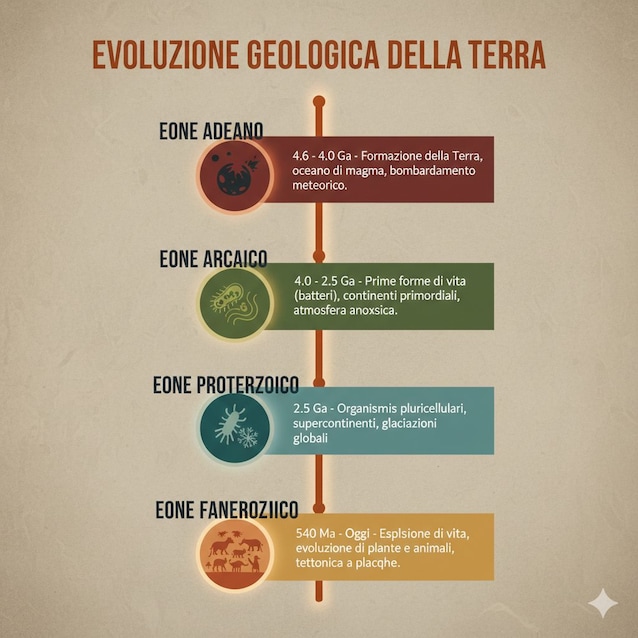
Design a structured infographic titled “Geological Evolution of the Earth.” It uses a vertical timeline with minimal icons for each era, readable sans-serif text, and an earthy and magma orange color palette.
Manga/anime style
Create a graphic novel-style illustration of a science communicator shooting yellow energy from his eyes while holding a tablet; the word ‘GEOPOP’ is rendered in 3D with glowing lava texture in the foreground.

