If you are a regular visitor of Instagramperhaps you have experienced seeing yours feeds be populated with content that no longer reflects your tastes. Why does the algorithm suggest things that no longer interest us? Is there a way to educate him or even reset him? Yes, we need to actively let them know what interests us. We need to start from one place first: what we see in the feed is the result of an artificial intelligence system designed to predict which content might engage us most. This system continuously analyzes our behavior (the “Likes” we put, the comments we write, the time spent watching a video, the contents we save, and so on) and uses this information to sort and select the posts in the feed. The feed, in fact, is not a simple list of what the accounts we follow post: it is the product of a series of machine learning modelssophisticated algorithms that learn from data to progressively improve forecasts.
Precisely because these systems they are based on our behaviorover time they can “learn” interests that in the long run no longer represent us or interpret some occasional interactions incorrectly. Watching a certain type of video for a few seconds or opening an author’s profile can be enough to make us see similar content for weeks. For this reason, Instagram provides various tools to “manually” intervene on the functioning of the feed and reorient the algorithm. We can explicitly indicate when something doesn’t interest us, manage suggested content, hide specific posts or even completely reset the preferences that the algorithm has built on us. In this in-depth analysis we will see how to clear your instagram feedbut only after having discovered a little more closely how the content suggestions offered within it work.
How the Instagram feed algorithm works
The contents that appear among the feed suggestions are selected by an AI-based system composed of several machine learning models. These models, in the case of the Instagram feed, analyze the user behavior and try to estimate what content they will have more probability of generating interactions.
The process can be simplified into three main steps.
- First of all, the system builds a sort of “inventory” of available content: collects public photos and videos that respect certain quality and integrity criteria of the platform.
- Secondly analyzes a series of signals (i.e. data that describes our activities on the app), such as posts we have “Liked”, profiles we follow or content we have interacted with in the past.
- Finally these contents undergo a classification process: The algorithm estimates which ones might be most relevant to us and places them higher in the feed.
The algorithm’s predictions are not based on a single indicator, but on dozens and dozens of signals of various nature. For example, in the case of reels, the system can estimate the probability that we will watch a video for more than a few seconds, that we will comment on the content or that we will use the same audio track in one of our reels. Factors that influence these predictions include the time we spend watching a video, how often we click on an audio link, the number of reels saved or shared, and even the behavior of other users with similar content.
In short, each of our actions (and also each of our “non-actions”) on the app becomes data that contributes to defining the profile of our interests. The more we interact with a certain type of content, the more the algorithm tends to show us other similar ones. This mechanism makes the feed highly personalized, but it also means that small signals (such as leaving a video playing while we put the phone down while we started doing something else) can influence the algorithm and, therefore, what we will be offered in the following days and weeks.
How to educate him
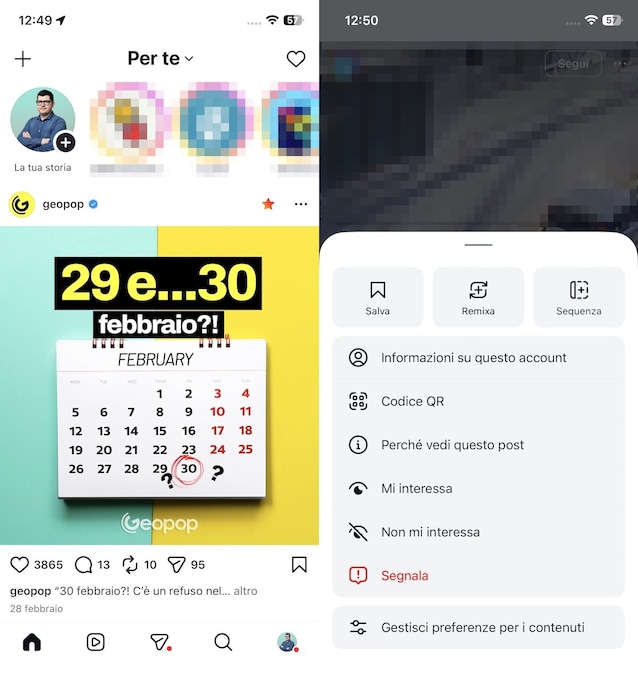
Since the feed depends directly on our behaviors, the easiest way to educate him consists of provide the algorithm with new signals. Instagram provides various functions that allow you to intervene directly on recommendations. These are available by tapping the menu three dots (at the top right of each post that is suggested or proposed to us).
One of the most immediate options is to select “I am not interested” from the menu of a post. With this action we communicate to the system that that content is not relevant to us: the algorithm will therefore reduce the probability of showing us posts by the same author or with similar characteristics. In a similar way we can use the function “Hide”which deletes content from your feed and helps limit similar items in the future.
Another useful tool is the section dedicated to managing suggested contents (reachable by selecting Manage content preferences of the menu we are talking about in this chapter). Here we can see which posts we have marked as interesting or not interesting and access other controls, such as the ability to filter sensitive content or hide suggestions that contain certain words, phrases or emojis. These tools allow you to more precisely customize the contents proposed by the algorithm.
If we encounter content that we deem inappropriate or violates the platform’s rules, we may also report them. Reporting not only serves to inform the platform of possible violations, but also helps to improve the moderation and recommendation systems.
Another option is to temporarily display a non-personalized feed. If we select the item “Follow yourself”Instagram shows the posts and reels of the accounts we follow simply in reverse chronological order, that is, from the most recent to the least recent. In this mode, the algorithm’s suggestions are not included, even if it is a temporary display that disappears when we close the app.
How to reset the feed to see the posts we like
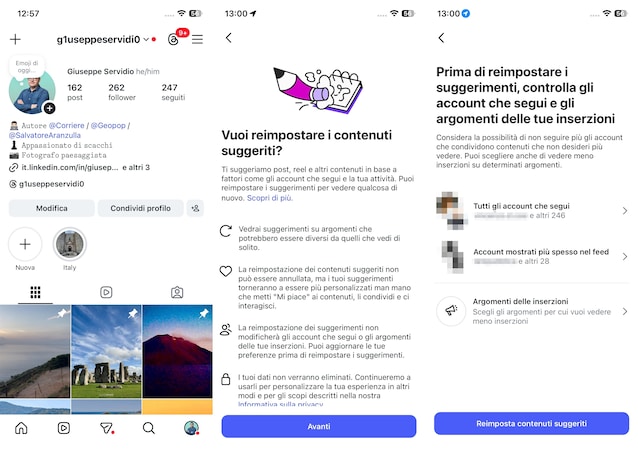
When we want to intervene more radically, we can reset your Instagram feed. The process is relatively simple and can be done in a few simple steps. Here’s how you can do it.
- Open theInstagram app and go to the main screen of yours profile.
- Touch the button with the three lines top right.
- Scroll the screen Settings and activities up to the section What do you see.
- Tap on the item Content preferences.
- Touch the voices Reset suggested contents > Next.
- Check the accounts you follow and the topics to see fewer ads for, tap Reset suggested content and follow the on-screen instructions to complete the procedure.