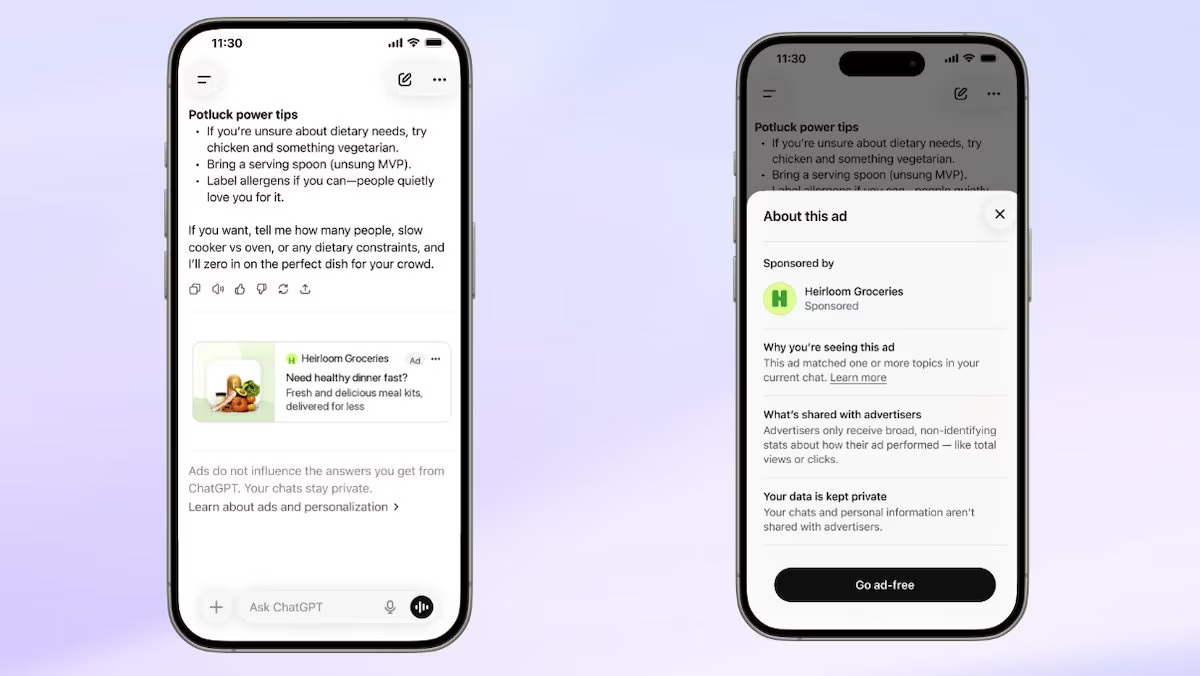
Starting next week, ChatGPT will also show advertisements in Europe. OpenAI announced the extension of ChatGPT Ads in 31 European markets: the 27 countries of the European Union (including Italy obviously) plus Norway, Iceland, Liechtenstein and Switzerland. The debut is scheduled for next week, so the arrival of the adverts in the famous OpenAI chatbot is now imminent. Not everyone, however, will see ads while conversing with the AI: ads will appear in the Free and Go plans, while Plus, Pro, Business, Enterprise and Edu will remain ad-free. Even accounts that are used by users under 18 are not affected by the news.
How OpenAI advertising works
To understand what changeslet’s start from where the advertisement will appear. Ads may appear below a ChatGPT response, will be clearly identified as sponsored, and will remain separate from the text generated by the chatbot. At least on paper, therefore, the ads should not be integrated into the responses returned by the chatbot, nor should they influence the latter. According to OpenAI, in fact, advertisers cannot pay to modify the responses of the artificial intelligence. The company directed by Sam Altman has in fact declared:
Ads are served on systems separate from our chat model, and advertisers have no ability to influence, categorize, or modify ChatGPT responses. The ads are separated and clearly labeled.
An interesting aspect concerns the how the ad is chosen to show to the user. OpenAI explains that the advertising system considers the context and intent of the conversation, as well as the characteristics of the advertisement, the landing page, i.e. the site to which any click leads, the advertiser’s instructions and the targeting parameters. If there are multiple relevant ads available, advertisers’ cheap offers may also come into play.
The issue of ad personalization and privacy
The difference compared to traditional search engine advertising lies above all in the amount of information that a conversation can contain, which is greater and can lead to potentially more precise and personalized ads. In EuropeHowever, this one customization will start with some limitations. OpenAI specifies that personalized ads will not initially be available in the European Economic Area, i.e. the area that includes the EU member states plus Iceland, Liechtenstein and Norway, nor in Switzerland. The ads, for European users, will therefore be shown based mainly on ongoing conversation and basic information such as language or general location. In other markets, when personalization is active, signals from previous chats, memory and interactions with ads can also be used.
This aspect leads directly to the question of privacy. OpenAI says it doesn’t share users’ conversations with advertisers and doesn’t sell their data. Companies do not receive your chats, history, memory, name, email, IP address, precise location, or sensitive information, such as health or political information. They rather receive gods aggregate datai.e. statistics referring to groups of users (and not individuals), such as the overall number of views and clicks. It must be said, however, that OpenAI has already stated that it intends to «evaluate (over time) additional measurement data, while continuing to protect user privacy».
How to eliminate advertising on ChatGPT
If the idea of seeing sponsored results on ChatGPT doesn’t excite you, you should know that it’s possible too eliminate advertising completely. Those who use the Free plan can select theAds-Free experiencei.e. without ads, but accepting lower usage limits and reduced access to some functions, such as image generation or deep research, i.e. tools dedicated to in-depth research. To activate this free option, here are the steps you should follow:
- Open the ChatGPT app and go to the section Settings.
- Select the option Ad Control and then Change your plan to remove ads.
- Tap the option Reduce message limits and when you see the message appear Ads are disabledyou will have confirmation that the operation was successful.
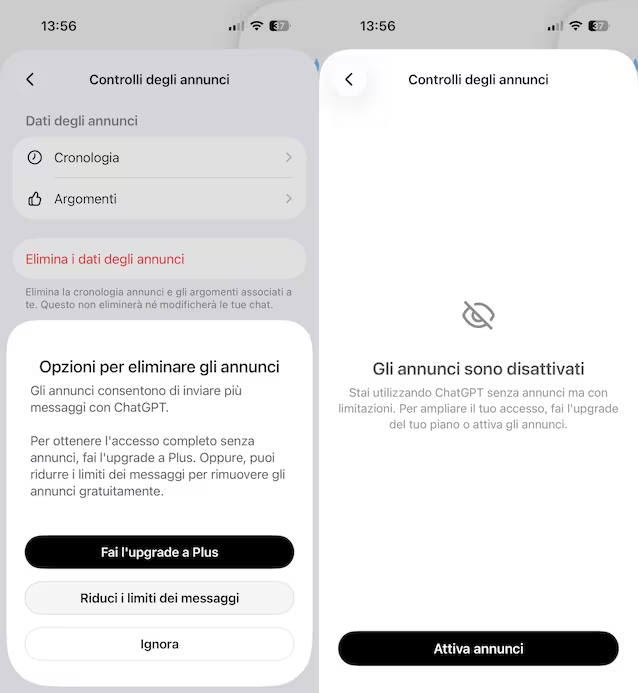
Alternatively, you can upgrade to Plus or Pro planswhich do not include advertising without the additional limits of the Free without ads option.