If you have a WhatsApp account and you care about your privacy, there are some settings of the famous messaging application that you should change if you want to prevent your contacts, or even unknown users who have come into possession of your number, from using some data visible on your account to “spy” on you in some way. In fact, anyone who has your number can potentially see your profile photo, know when you are online and check whether or not you have read a message. Strangers can call you or place you in groups without your explicit consent. Let’s see how to change these options for lock WhatsApp and protect online privacy.
The privacy options everyone should change on WhatsApp
To get started lock down your privacy on WhatsAppyou could start with some basic options, which anyone should consider customizing.
To proceed, go directly to the tab You at the bottom right and then click on Privacy. In this section you will find a real control panel where you can decide who has permission to see elements such aslast login and online statustheprofile picturei link inserted in the biography and the section Info. For each of these items, WhatsApp allows you to choose between four options:
- Everyonewhich is the one we advise you not to use in any case.
- My contactsthe one that can work well in the vast majority of cases.
- My contacts except…which serves to selectively exclude someone.
- Nobodythe most prudent one which prevents anyone from accessing a given piece of information in your profile.
However, there is a rule of reciprocity: if you decide to hide your last login or online status, you will no longer be able to spy on that of other users.
Another crucial element concerns the read receiptsor the famous blue ticks of WhatsApp. You can deactivate them freely from the privacy menu, but reciprocity applies in this case too: you will no longer see the blue ticks of others and you will not be able to know who has looked at your status updates (the icon of a crossed out eye will appear instead of the list of viewers). In group chats, however, reading receipts always remain active for everyone.
If you want to avoid being disturbed, within the same menu you can activate the muting of unknown numbers and block or report annoying profiles. Also in the privacy settings, you can deactivate real-time location sharing and manage the timer for ephemeral messages, i.e. messages that self-destruct after a certain period of time. Entering the advanced optionsyou can also protect your IP address during calls (the IP address is the numerical code that identifies your device on the internet, and hiding it prevents someone from tracking you), disable link previews And block a high volume of messages from unknown accounts.
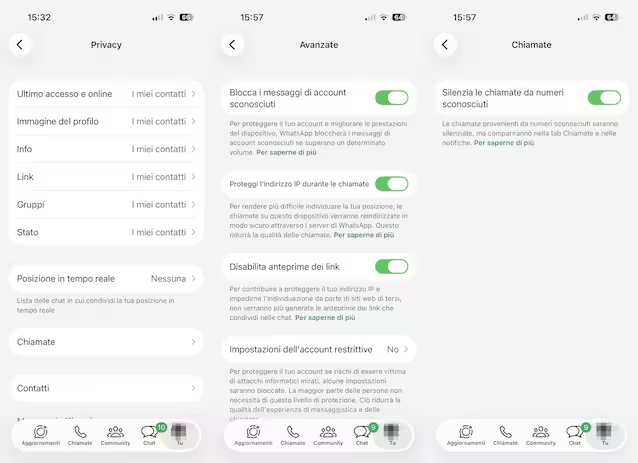
Advanced WhatsApp options to preserve privacy
If you want an even more stringent level of protection for individual conversations, WhatsApp offers a feature called Enhanced chat privacy. This option prevents photos and videos from automatically saving to your phone’s gallery, blocks chat export, and prevents Meta AI from being used to generate summaries or images within that specific conversation. It is good to specify that all your messages are already protected by end-to-end encryptionan encryption system that makes messages readable only by the sender and recipient, preventing anyone else, even Meta AI, from intercepting them. The Enhanced Chat Privacy feature is designed to offer additional protection.
To activate advanced privacy in a single chat just go to the chat settings of your interest (reachable by opening the chat and touching its name) and then selecting the item Enhanced chat privacywhich will give you access to a screen from which you can activate the setting using a specific switch. In groups, activation is up to administrators via the group permissions menu. However, there is an important exception to keep in mind: users who do not use the application updated to the latest version may still be able to download multimedia files or share content externally, and the function is not available in chats with companies that use Meta to manage their messages.