Let’s take a closer look at four new features that could arrive on WhatsApp in the future: an integrated browser, scheduled messages, a new Settings section, sound stickers and filters for mentions.
WhatsApp he’s testing a lot news that could change the way we use the app of Meta messaging. Among the many functions under development there are some that deserve to be analyzed carefully. Among these we remember the arrival of a integrated browser to open links without leaving the chats, the possibility of schedule the sending of messagesa new one simplified version of the settings and even sound stickers. Not all of these new October 2026 features are already available and some may never arrive in the stable version of WhatsApp, the one we all use.
Built-in browser on WhatsApp for iOS
Let’s start from the first news, the one that concerns thearrival of an integrated browser on WhatsApp for iOSspotted by WABetaInfo in the beta version 26.41.10.72. The current version of the app already allows you to open some business connections directly, as long as they adhere to certain security standards, such as the use of the HTTPS protocol. With the new integrated browser, this limitation should disappear and it will be possible to open any link shared in chat directly within WhatsApp, without necessarily having to go through Safari or another web browsing application.
The function must be activated from the settings and, upon first use, will be accompanied by a brief explanation. If the user prefers to browse with their usual browser, they can continue to do so by selecting it from a specific menu or by disabling the In-app Browser option. In an ad hoc section that will be available in WhatsApp settings it will also be possible to delete cookies, cache and history.
It is currently unclear when the feature will be available in the stable version of WhatsApp.
Scheduled messages
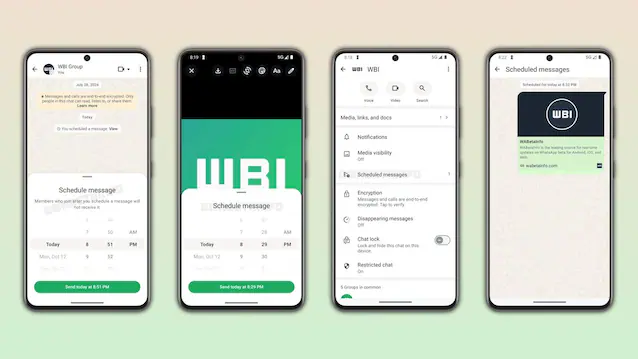
Another long-awaited feature concerns i scheduled messageswhich could initially land on the version of WhatsApp for Android. The novelty was also identified in this case by WABetaInfo in beta version 2.26.8.11 of WhatsApp for Android. Using this feature is simple: by holding down the send button, the user can access a contextual menu through which to decide the date and time to send a message. A dedicated section will also allow you to check those already programmed before they are sent.
Messages can be scheduled at least ten minutes in advance and up to two weeks in advance. Both text messages and links, videos and images can be programmed. The function can be used both to schedule messages in individual and group chats.
The feature is rolling out to some Android beta testers and may reach other users in the coming weeks.
New look for settings on iPhone
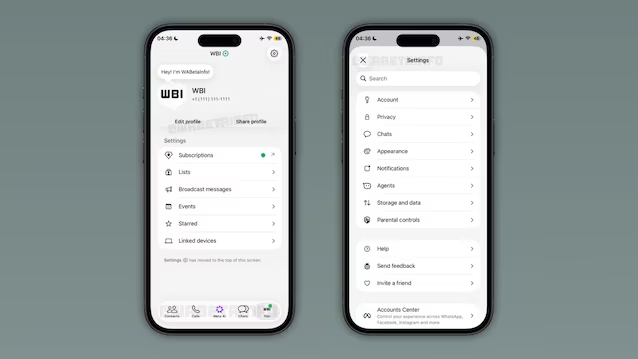
Even the settings screen is preparing to change its face, at least on the iPhone. In beta version 26.40.10.21 for iOS, reviewed by WABetaInfo and distributed via TestFlight, the traditional section Settings is to all intents and purposes replaced by the card You. This is to put the user’s personal profile at the center and make access to the most often used settings more immediate.
Your profile photo, name and phone number will appear at the top, with quick commands to edit or share your information. By tapping the name you can switch to another profile or set up a new account. Further down you will find direct links to subscriptions, personalized lists, broadcast messages, events, content saved as favorites and connected devices.
The more technical options will instead be collected in a separate area, accessible through the gear icon. Settings relating to accounts, privacy, chat, notifications, look and feel, data consumption, parental controls and support will be moved here. There is also an internal search bar, useful for quickly locating an item without having to scroll through all the options. The new interface is still under development and will need to be tested before any distribution to all WhatsApp users.
Sound stickers
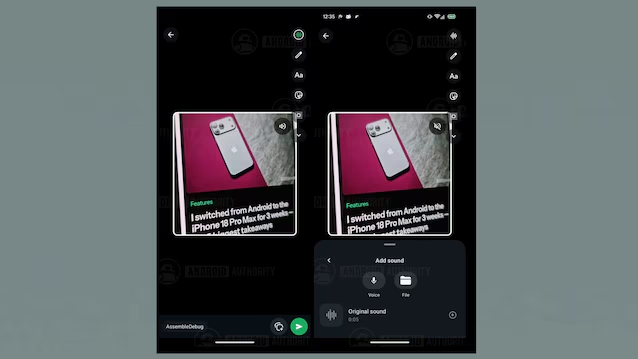
Another novelty that we would like to point out to you was discovered by our colleagues at Android Authority by examining the WhatsApp APK file for Android. This is a function that would allow stickers to be made more expressive, introducing the possibility of associating a sound with them. Traces identified in WhatsApp version 2.26.41.11 suggest that it is possible to create sound stickers starting from images or videos. In the first case, a new sound wave icon should allow you to record your voice or select an audio file saved on your phone. The maximum expected duration is ten seconds. Once the sticker is sent, a volume icon will allow the recipient to play the sound.
For animated stickers created from videos, however, the app could automatically embed five seconds of original audio, leaving the user the option to replace it with a personal recording or another file. An option would also be introduced to remove the outline of the stickers, now added automatically, directly from the creation screen.
Since these innovations were identified by the analysis of an APK file, it is not certain that these will actually arrive in future versions of WhatsApp (although the chances of this happening are not remote at all).
Filter by mentions and replies
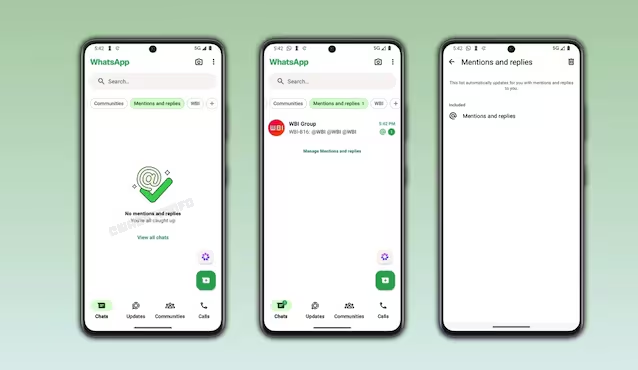
One last piece of news that we would like to point out, also in this case discovered by WABetaInfo in the beta version 2.26.42.12 of WhatsApp for Android, concerns the new Mentions and replies filterdesigned to make it easier to find conversations where someone has mentioned you or responded to your message. The filter is located at the top of the Chats tab, along with those dedicated to unread messages, favorites and groups. By selecting it, conversations that contain relevant mentions or replies are shown exclusively, accompanied by a numerical indicator that indicates those that are pending. If there are no interactions to recover, however, a blank screen appears from which you can return to the complete list.