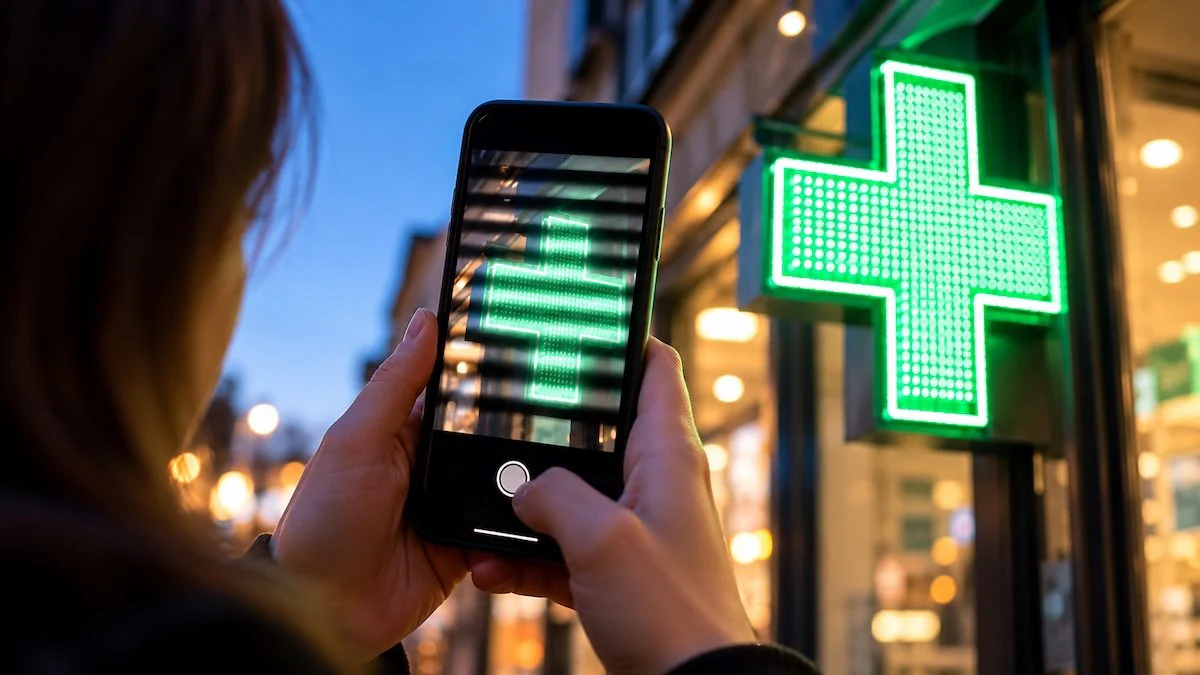
Some LED signs and neon lights appear stable to the naked eye, but may show dark bands in photos and videos. The phenomenon depends on the rapid oscillations of light and the way the camera captures images. Some smartphone settings can help mitigate this.
Sometimes it happens frame a lighted sign with your smartphone and see it flash on the screeneven if it seemed stable in person. It can happen with shop signs or LED advertising panels. In some cases, dark bands also appear that cross the frame and remain visible in the photo or video.
It doesn’t necessarily mean the sign or phone is defective. Often the phenomenon depends on the meeting between very rapid changes in brightness and the way the camera records the scene. However, there are some tips that can help reduce flicker during filming.
Why do signs and LED lights appear to flash in videos
A light source can change intensity so rapidly that it appears stable to the human eye. This alternation, called flickering or flickerit can become noticeable in shooting because the camera records light at precise time intervals.
This is the case with many LED signs. Diodes emit light when an electric current flows through them, but their intensity also depends on the circuit that powers them. To adjust it, the pulse width modulation (PWM)from English Pulse Width Modulation: they are turned on and off quickly, varying the duration of the phases in which they remain active. The longer they remain on during each cycle, the higher the perceived average intensity. This explains why, in some signs, flickering becomes more noticeable when the brightness is lowered.
PWM is not the only possible cause. Some lamps exhibit oscillations related to the power supply. In Italy the alternating current of the mains has a frequency of 50 hertz (Hz) and, with some systems, the brightness can vary double, that is, 100 times per second. Other devices, however, maintain a more uniform emission.
Even the word “neon” can be misleading. Many modern signs that mimic traditional light tubes actually use LEDs. In classic neon, however, the light is produced by an electric discharge inside a tube containing gas and, depending on the power system, its intensity can oscillate rapidly, producing similar effects in the shots.
Why dark bands appear in photos and videos
It’s one thing to see a sign that seems to turn on and off, but it’s another to end up with streaks across the image. To understand its origin we must consider how the smartphone sensor acquires the scene.
Many cameras use a metering mode called rolling shutter: the lines that make up the image are recorded in succession, not all at the same time. If in the meantime the source changes intensity, one part may appear lighter and the next darker. They appear like this brightness bandsoften horizontal. In videos they can slide across the frame, because the position of the light and dark areas changes from one frame to the next.
Two recording parameters also affect these effects. The first is the frame rateexpressed in fps (from English frames per second), which indicates how many images are recorded every second. The other is the exposure timei.e. the duration of the interval in which each part of the sensor collects light. If the latter is very short, it may only capture a fraction of the on-off cycle, making the bands more noticeable.
The effect does not coincide with the moiré that can be noticed when photographing a screen. In that case the waves mainly derive from the interaction between repetitive textures and camera sampling, while in the shots of the signs the bands depend on the oscillations of the light.
How to reduce sign flickering in photos and videos
Before the definitive recovery, it is worth it record a few seconds of testing and check the result, because the preview does not always show exactly what will remain in the file. If flashes or stripes appear, you can change one setting at a time and see if the situation improves.
For videos, a first attempt is to record a 25 fpsor 50 where available, rather than 30 or 60. The choice can help especially with lights whose oscillations are linked to the electrical supply. Come on iPhone compatible, for example, you can enable i PAL formats opening Settingsreaching the section from there Camera and then that Record videos. You can then select the frequency directly from the camera in the mode Videotapping the value shown at the top of the screen, keeping in mind that the options may change depending on the model.
However, fps is not the only parameter. If the app allows manual controls, it is advisable to also intervene on the exposure time: for sources whose brightness oscillates 100 times per second you can try values like 1/50 or 1/100 second. A very short interval, for example 1/1000, risks accentuating the bands, because it captures only part of the light cycle. PWM-regulated LEDs, however, may require different values based on how often they are turned on and off.
On some smartphones Androidlike compatible Samsung Galaxy, you can make this adjustment by opening the app Cameratouching Other and selecting Pro Videoswhich allows you to manually change the shutter speed. If stabilization is active Super Steadyit may be useful to try disabling it: according to Samsung, in certain lighting conditions this function can accentuate flickering and the appearance of dark bands.
You can also search for functions anti-flicker or anti-bandingsometimes available with a choice between 50 and 60 Hz. These values concern the characteristics of the lighting, not the number of frames recorded per second. Not all smartphones offer such settings, which in some cases are managed automatically. Those who don’t find manual controls in the standard app can check the availability of compatible photography applications that support them.
In the photographs, lengthen the exposure can reduce streaks. By collecting light for longer, the sensor tends to integrate different oscillations. However, it is best to do this with still subjects, possibly placing the phone on a stable surface, otherwise the risk of blurry images increases.
If none of the settings work, the limit may be due to the sign’s electronics. In some cases, to completely eliminate the bands it would be necessary to intervene on the system that controls the LEDs, rather than on the camera.