It is increasingly complicated to be able to have the SPID for free (as demonstrated by the recent PosteID affair). And, as expected, more and more Italians are interested in have a free digital identity with the CIE as an alternative to the SPID. The CIE, in fact, being equipped with a radio frequency microprocessor which stores the owner’s personal information, photo and fingerprints, offers (like the SPID) access to Public Administration services with the highest security standards. Furthermore, unlike SPID, which is based on private intermediaries (the so-called Identity Providers), the CIE does not require having to contact third parties in order to be used. This is because, as the Ministry of the Interior on the website dedicated to the CIE «The Electronic Identity Card (CIE) is the access and authentication key issued by the State to access the online services of the public administrations and participating private individuals with all the levels of security required.». Let’s see, therefore, how the CIE works.
What is the CIE used for: all possible uses
As anticipated in the introduction of the article, the CIE can be used like the SPID to access all the digital services provided by the Public Administration, but not only. CIE can potentially be used in these cases.
- Universal access to PA services: allows you to authenticate on digital portals, such as municipal ones, taking advantage of an interoperability standard recognized throughout the European Union and regulated byeIDAS (Electronic Identification, Authentication and Trust Services).
- Rapid identification for private services: simplifies and certifies registration and check-in procedures at hotels, banks or telephone companies, eliminating the need for photocopies and paper documents.
- Smart mobility: the card acts as a dematerialized travel document, allowing access to metro and bus turnstiles or the unlocking of sharing mobility services without the need for physical season tickets and paper travel documents.
- Digital leisure ticket: it replaces traditional tickets for entry to museums, concerts and sporting events, speeding up checks at gates.
- Company badge: It can be configured to replace the work card, safely managing both the opening of office doors and the automatic detection of attendance.
Let’s talk about potential uses, since not all the cases listed represent a concrete and widespread use for the average Italian today.
How to activate CIE level 3 on your smartphone
Authentication via CIE can be done via three different levels of security.
- Level 1: access is performed with username and password.
- Level 2: login occurs with username, password and a temporary OTP code.
- Level 3: access takes place using a reader or smartphone equipped with NFC technology to read the CIE.
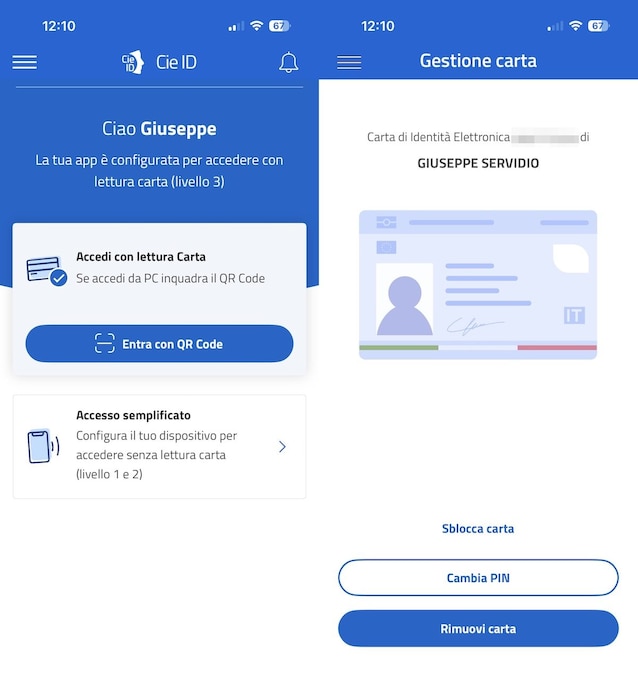
Regarding the third level, the possibility of exploiting technology is interesting NFC (Near Field Communication), now available on all smartphones recently launched on the market (it would be the same technology that allows contactless payments, so to speak), in combination with the dedicated application CieID. In this way it is possible to use the smartphone as a reader, thus allowing you to authenticate via CIE with the maximum level of security.
To proceed in this direction it is essential retrieve your 8-digit PIN code associated with the document. But where is this code located? There first half of the PIN code of the CIE is delivered bymunicipal operator at the time of the request, while the second half can be found in document delivered together with physical card. Only by combining these two sequences do we obtain the complete key necessary for activation. Once you have the full PIN, for activate level 3 on your smartphone equipped with NFC you need to follow a simple guided procedure.
- Download the CieID app from the Google Play Store or the Apple App Store.
- Enter the Full PIN.
- Carry out the scan the document: to do it, you have to place the CIE on the back of the smartphoneat the NFC antenna, and keep it in place until the data encrypted in the chip has been read.
- Once this phase is finished, the card is digitally active.
- For future access, it will not be mandatory to type the PIN every time: the app allows you to configure thebiometric authentication (fingerprint or facial recognition), which represents a more convenient access method than manually entering the PIN.
From 3 August 2026 the CIE becomes mandatory
The transition towards digital identity managed through CIE is not only a question of economic savings, but also of necessary technological adaptation. While on the one hand the SPID is no longer becoming a free option (at least for a good portion of the certification bodies that provide the service), the CIE does not require the payment of an annual fee. Even more importantly, the Electronic Identity Card represents the future reference standard. It is crucial to note that the validity of old paper documents will definitively cease on 3 August 2026 throughout the European Unionmaking the transition to the electronic format an obligation for all European citizens.
