If in recent days you have received in the official chat of WhatsApp a video showing the function with which this is possible choose who can add you to groupsyou should know that this possibility has been offered by the messaging platform for some time. This is a very useful WhatsApp feature designed to protect your privacy which, if activated, can prevent you from ending up in dubious group chats (like those used by some scammers to trap their potential victims, perhaps promising easy earnings). Turning on the setting takes a few steps. Once this option is enabled, anyone who wants to add you to a group will be able to do so by sending you a link and only if you accept this invitation will you actually be added to the chat.
This is because, when the setting is active and the administrator of a WhatsApp group that is not among the contacts tries to add you but his number is not saved in your contacts, he will not be able to add you directly and will display a warning informing him of this. They will then need to send you a private invitation via chat, which you can accept within three days before it expires. In the next paragraphs we will explain how to choose who can add you to WhatsApp groups taking advantage of this specific privacy option.
How to choose who can add you to WhatsApp groups on Android
For choose who can add you to WhatsApp groups on Androidproceed like this:
- Start theWhatsApp app.
- Touch the button ⋮ and go in Settings > Privacy > Groups.
- Select the privacy option My contacts to only allow your contacts to add you to WhatsApp groups or the option My contacts except…so that the contacts saved in your phone’s address book, except those you decide to exclude, can add you directly to a group.

How to Change Privacy Options for Group Chats on iPhone
For choose who can add you to WhatsApp groups on iPhonefollow these steps:
- Open theWhatsApp app.
- Go to the section Settings > Privacy > Groups.
- Choose the privacy option My contacts if you want to allow all your contacts to add you to WhatsApp groups or the option My contacts except…if you want the contacts saved in your smartphone’s address book, with the exception of those you want to exclude, to be able to include you in a group without asking your permission.

How it works on Mac computers
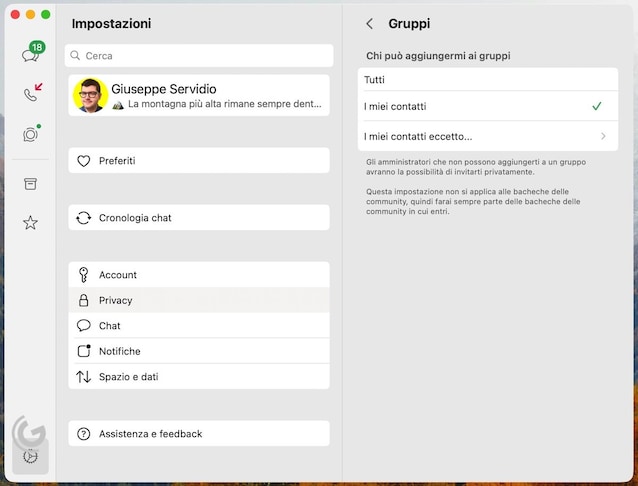
Let’s now see how to proceed computerexploiting WhatsApp Web and the WhatsApp desktop client for Mac (the one for Windows, at least at the moment, does not allow you to act on these settings). In both cases, simply follow this procedure:
- Open the WhatsApp client or log in to WhatsApp Web from your computer’s browser.
- Click on the icon Settings (the’gear bottom left) and then go to Privacy > Groups.
- Finally, choose the option you prefer (e.g. My contacts or My contacts except…).