
A sudden wave of notifications for restoring login credentials in recent days it has overwhelmed 17.5 million Instagram users. The emails in question were not part of a phishing attempt (sending spoofed emails to steal data). In fact, these were absolutely authentic communications from the Meta servers, showever solicited by unauthorized third party actors.
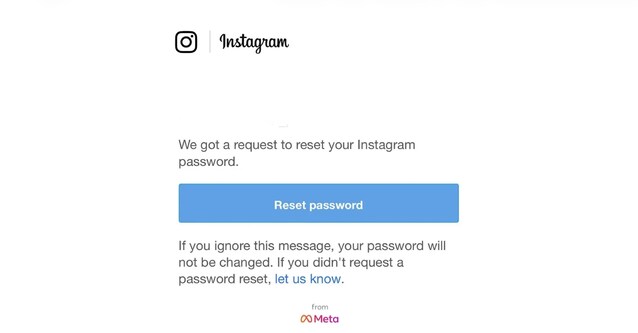
The genesis of this phenomenon is still the subject of discussion between the parties involved. On the one hand, we have the alarm raised by security analysts who hypothesize a massive compromise of sensitive data; on the other, we find the official position of Half (the company that owns Instagram), which categorically denies any data breach (or data breach) and attributes the incident to a technical bug that has now been fixed. In such a confusing scenario it is difficult to trace the real origin of the anomaly.
The hypothesis of the theft of 17.5 million Instagram accounts
The phenomenon we just mentioned at the beginning is anything but limited. According to a reconstruction made by security experts at Malwarebytesin fact, they would have been approx 17.5 million Instagram profiles affected by the phenomenon. In a post published on the Bluesky social network, the mass sending of these emails would not be attributable to a simple system error, but would represent the tip of the iceberg of a larger and more complex criminal operation. Analysts say malicious actors managed to steal a database containing Instagram users’ personal information. This is the statement made by the experts:
Cybercriminals stole sensitive information from 17.5 million Instagram accounts, including usernames, physical addresses, phone numbers, email addresses, and more. This data is available for sale on the dark web and can be misused by cyber criminals.
Meta’s response
Faced with such serious accusations, the Meta’s response she didn’t wait long. By curiously choosing the rival platform
We fixed an issue that allowed external parties to request password reset emails for some users. There has been no breach of our systems and your Instagram accounts are safe. You can ignore such emails. We apologize for any confusion.
Instagram, therefore, attributed the phenomenon to a technical problemnow corrected, which allowed an unspecified «outside” Of activate the password recovery mechanism for a limited number of users. This suggests that someone exploited a weakness in the application form (possibly by automating the entry of email addresses in bulk) to generate spam, but never had actual access to the accounts.
What to do if you have received the password reset email
The Meta’s statements did not resolve the doubts about what happened. Although Instagram says there was no breach of its systems, it does not explain how the «outside» was in possession of the email addresses of the users who received the reset requests. Uncertainties also remain regarding the true extent of the event and the identity of those who exploited the technical bug. We will monitor the situation and return to the topic as soon as there is any evidence of what happened. In the meantime, here it is what should you do if you have received the reset email.
- Reset your password: even if Instagram claims that this is not necessary, we still suggest you reset the password of your Instagram account by opening the social network app, going to your profileby pressing the button ≡ and acting from the section Account Management Center > Password & Security > Change Password.

- Enable two-factor authentication: in this way you will protect your profile from any unwanted access. To do this, once you arrive in the section Account Management Center > Passwords & Securitytouch the wording Two-factor authentication and follow the appropriate instructions. We recommend that you activate the reception of the second factor via appropriate channels authentication app and not via SMSgiven that the latter are unsafe, as also underlined by the FBI.
- Do not click on the links in the emails: to change the password on your Instagram account, act directly from the Instagram app (as we showed you in the first point). This is because cyber criminals could take advantage of the general confusion caused by what happened to send fake emails from Meta containing malicious links. Always keep your eyes wide open before opening any hyperlink: cyber dangers are always around the corner!
